Latest Changes in Copilot Chat: June 2025 Update Microsoft 365 Copilot Chat (the free version of Copilot) has received impactful updates to boost productivity, security, and usability across the enterprise. Here's a concise overview: 1. Copilot Chat in Microsoft 365 Apps Now embedded in Word, Excel, PowerPoint, Outlook, OneNote, and Teams: Summarize and interact with documents. Use agents without a full Copilot license. Admins manage visibility via pinning. 🔗 https://www.microsoft.com/microsoft-365/copilot 2. Quality & Performance Sharper search, better summarization. OCR for scanned PDFs. Realistic image generation. Enhanced code interpreter. 📈 11% boost in positive feedback. 3. Copilot Pages & Prompt Suggestions Convert responses into editable pages. Smarter prompts based on chat history. 🔗 https://aka.ms/CopilotLab 4. Agent Customization Build agents with Copilot Studio. Centralized admin management. Reusable connectors. 🔗 https://aka.ms/CopilotStudio 5. Training...
Posts
Embracing Microsoft Intune Cloud PKI: A Leap Towards Enhanced Security The digital landscape is evolving rapidly, and with it, the need for robust security measures has never been more critical. Public Key Infrastructure (PKI), a framework that secures communications between devices and services, is at the forefront of this security revolution. The advent of Intune Cloud PKI has further transformed the domain, offering a more streamlined, secure, and cost-effective approach compared to traditional On-Premises PKI. The Significance of Cloud PKI Cloud PKI refers to the management and storage of digital certificates and keys in the cloud. This modern approach to PKI management offers numerous benefits over its on-premises counterpart: Scalability : Cloud PKI solutions can easily scale up or down based on the organization's needs, ensuring that security measures grow in tandem with the company. Cost-Effectiveness : By eliminating the need for physical infrastructure and dedicate...
News Update Windows Update for Business Reports If you are using Windows Update for Business (WUfB) to manage updates for your devices, you may want to know how well they are performing and what issues they are facing. WUfB Reports can help you with that. WUfB Reports are a set of dashboards and reports that provide insights into the update status, compliance, and health of your devices. You can access them from the Microsoft Endpoint Manager admin center or the Microsoft 365 admin center. Some of the benefits of using WUfB Reports are: You can see the update compliance and deployment progress of your devices across different rings and policies. You can identify devices that are missing updates, have update errors, or are out of support. You can troubleshoot update issues by drilling down into the details of each device and update. You can export the data to Excel or Power BI for further analysis and reporting. To use WUfB Reports, you need to have devices enrolled in Microsoft Intune ...
Moving KMS to a New Server
In this guide, I'll take you through the process of uninstalling a Key Management Service (KMS) host key and then installing it on a new server, step-by-step. Step 1: Uninstall the KMS Host Key To remove the current KMS host key from the server, run the following command: cscript.exe C:\windows\system32\slmgr.vbs -upk This command will uninstall the KMS host key. Step 2: Install the Default KMS Key Install the default KMS key by running the following command: cscript.exe C:\windows\system32\slmgr.vbs /ipk [KMS Client Setup Key] You can find the default KMS client setup keys here. Step 3: Delete the Record from DNS Open the DNS console and expand the _tcp node under the domain.com. You'll see a record called _VLMCS. Delete this record. Now, the KMS server is uninstalled. Step 4: Install KMS on a New Server To install KMS on a new server, enter the following command: cscript.exe C:\windows\system32\slmgr.vbs /ipk Step 5: Activate the KMS Host Activate the KMS host by entering thi...

Why do my Windows 10 2004, 20H2, and 21H1, and 22H2 systems continue to show compliant even though I've deployed the Feature Update to 22H2, and they are clearly NOT 22H2!? Make sure you are also deploying the Windows 10 22H2 Enablement Package! Enablement package? Each time a monthly cumulative update gets installed, it includes files from the upcoming Feature Update. These files are stored on the drive and include the updates for the next Feature Update. In October 2022, all the pieces were in place for Windows 10 22H2. Microsoft then released "Feature Update to Windows 10 Version 22H2 x64-based systems 2022-10 via Enablement Package". (One for each CPU architecture.) So, in ConfigMgr add the enablement package to your deployment (it is language agnostic) and let it fly. The enablement package is about 2mb and takes only a few minutes and a reboot. Here is some more information about the enablement package. Note: Any Windows 10 version prior to 2004 can't use the e...
SQL Server Management Studio 18.11.1 Errors Galore!

While attempting to upgrade SSMS to version 18.11.1, it kept failing with a very odd error I'd never run across before. "MainViewModel.OnBundleAction: Bundle action failed: Fatal error during installation (0x80070643)" After trying many of the tips on the web like updating Visual C++ Redistributable, running a .NET repair, etc., I finally found the solution. I fired up trusty old Procmon64 and let it capture while I attempted to install SSMS 18.11.1. Once it failed, I went to Tools \ Count Occurrences and chose "Result". The count showed 222 "Access Denied" results. I double-clicked that line which took me to the list of "Access Denied". I found the ones that were the culprit. Evidently, SSMS 18.11.1 needs to install some help files and it couldn't access the HelpLibrary2 folder. My assumption was the permissions were incorrect, so I addressed that by running the following command from an elevated CMD prompt: icacls.exe C:\ProgramData\...


Report: Modern Browsers

I threw this together and thought someone might be able to use it. Feedback welcome. If something doesn't work, let me know. Download here . 4/23/22 - Updated the report with some improvements.
Delivery Optimization in Microsoft Endpoint Configuration Manager (ConfigMgr)

Delivery Optimization can be a powerful tool to help manage your content. However, getting things configured can be confusing and daunting. Here I've broken out the steps to get you going. Client Settings 1. BranchCache and PeerCache. a. First, create a new Custom Device Settings and check the box for “Client Cache Settings” and “Delivery Optimization”. b. BranchCache . To enable BranchCache on clients, set “Configure BranchCache” and “Enable BranchCache” to Yes and set the “Maximum BranchCache cache size (percentage of disk)”. (Default is 10). c. PeerCache . To make the client a SuperPeer (PeerCache Source), set “Enable as peer cache source” to “Yes”. Note: SuperPeers should be clients that are newer (faster), always on devices, that are hard wired, and have plenty of hard drive space. Note: Build a WQL query to create and maintain a collection of SuperPeers. I.E., CPU, memory, free space, etc....
WSUS Products

If you are trying to decide what Products to include in your WSUS settings, this is the article for you. ConfigMgr and WSUS currently have a dozen Windows 10 “products” listed but the descriptions are lacking. Windows 10 and Later Drivers: These are drivers that will be offered to all builds of Windows 10 all the time, excluding upgrade scenarios (i.e., via Orchestrator, DSM, or Device Manager). They will not download during a Dynamic Update (i.e., Windows 10 upgrading itself from build 1511 to 1607). They should only include KBs for the current Win10 version. . Windows 10 and Later Upgrade & Servicing Drivers: These are drivers that are offered in all Win10 scenarios (i.e., via Orchestrator, DSM, Device Manager, or during DU). They may include some KBs later win10 version and enable current win10 version to upgrade. . Windows 10 Anniversary Update and Later Servicing Drivers: These drivers apply only to Window...
Windows Language Packs - Some Translations Not Complete
Be sure to re-install the inbox apps if you want them to be translated on the first launch. See: https://www.powershellgallery.com/packages/Windows365LanguagesInstaller/1.0.0.2/Content/Windows365LanguagesInstaller.ps1 If using a Task Sequence, the following results in a machine that is fully translated on the first use (you don’t need to use both LP and LXP). Install LP: dism.exe /Image:%OSDTargetSystemDrive%\ /ScratchDir:%OSDTargetSystemDrive%\Windows\Temp /Add-Package /PackagePath:".\Microsoft-Windows-Client-Language-Pack_x64_%Language%.cab" Install LXP: powershell.exe -executionpolicy bypass -command "Add-AppxProvisionedPackage -Path %OSDTargetSystemDrive%\ -PackagePath .\LanguageExperiencePack.%Language%.Neutral.appx" -LicensePath ".\License.xml" Install FoD: powershell.exe -executionpolicy bypass -command $cabs = Get-ChildItem -Filter "*.cab"; foreach ($cab in $cabs) { Add-WindowsPackage -PackagePath "$($cab.FullName)" -NoRestar...
Driver Verifier Manager
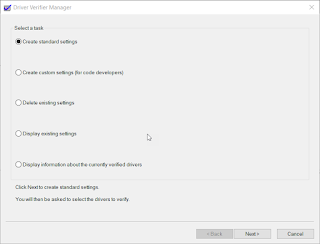
Have you ever had problems with a "bad" driver? You get occassional BSODs and maybe even lost some work? The reason could be that you have unsigned/unverified drivers. Luckily, there is a built-in tool for verifying drivers! And, unlike many things Microsoft, it is actually named intuitively! VERIFIER! So, how do we use it? Well, that is the easy part. You launch it, click "yes" to elevate it, click Next - Next and it will tell you if you have any unsigned drivers. It is that easy! Once you indentify the unsigned driver(s), you only need to go visit the device manufacturer website and download the latest, signed drivers. Another reason a driver may crash (or cause a BSOD) is because it was not made for the version of Windows you are on. Luckily, verifier can also help with that! Launch verifier, click Next, Next and hopefully you'll get a message that no unsigned drivers were found. If so, then the next thing you'll want to do is scan for ...
C Drive Low on Space? Need to move your Outlook OST? Don't! Create a symbolic link instead!

I have my HD partitioned into a C: and D:. C: is about 100gb and the plan was to use it for the OS and Office. D: is about 900gb and I use it for everything else – downloads, OneDrive, etc. I noticed my C: drive was running out of space and the culprit was my Outlook OST!! My OST was about 48gb!! (I like to download the maximum amount so searches go faster.) I tried to move the OST to D: using the “Account Settings...” and even editing the registry, ut Outlook was not having it. It kept recreating the OST on C: and ignoring the OST file I had moved. So, I decided to play a trick on Outlook. First, I created a folder on D: called Outlook. Next, I closed Outlook and *MOVED* my OST from C:\Users\ \AppData\Local\Microsoft\Outlook\ to D:\Outlook\ Now for the magic. I created a symbolic link to the OST file!! (You can also use the junction tool from Sysinternals.) From a CMD prompt: mklink C:\Users\ \AppData\Local\Microsoft\Outlook\emailid@contoso.com.ost D:\Outlook\emailid@contoso...