Posts

Showing posts with the label MICROSOFT

Report: Modern Browsers

Image
I threw this together and thought someone might be able to use it. Feedback welcome. If something doesn't work, let me know. Download here . 4/23/22 - Updated the report with some improvements.

WSUS Products

Image
If you are trying to decide what Products to include in your WSUS settings, this is the article for you.  ConfigMgr and WSUS currently have a dozen Windows 10 “products” listed but the descriptions are lacking. Windows 10 and Later Drivers:  These are drivers that will be offered to all builds of Windows 10 all the time, excluding upgrade scenarios (i.e., via Orchestrator, DSM, or Device Manager). They will not download during a Dynamic Update (i.e., Windows 10 upgrading itself from build 1511 to 1607).    They should only include KBs for the current Win10 version. . Windows 10 and Later Upgrade & Servicing Drivers:  These are drivers that are offered in all Win10 scenarios (i.e., via Orchestrator, DSM, Device Manager, or during DU). They may include some KBs later win10 version and enable current win10 version to upgrade. . Windows 10 Anniversary Update and Later Servicing Drivers:   These drivers apply only to Window...

Windows Language Packs - Some Translations Not Complete

Be sure to re-install the inbox apps if you want them to be translated on the first launch. See: https://www.powershellgallery.com/packages/Windows365LanguagesInstaller/1.0.0.2/Content/Windows365LanguagesInstaller.ps1 If using a Task Sequence, the following results in a machine that is fully translated on the first use (you don’t need to use both LP and LXP). Install LP: dism.exe /Image:%OSDTargetSystemDrive%\ /ScratchDir:%OSDTargetSystemDrive%\Windows\Temp /Add-Package /PackagePath:".\Microsoft-Windows-Client-Language-Pack_x64_%Language%.cab"  Install LXP: powershell.exe -executionpolicy bypass -command "Add-AppxProvisionedPackage -Path %OSDTargetSystemDrive%\ -PackagePath .\LanguageExperiencePack.%Language%.Neutral.appx" -LicensePath ".\License.xml" Install FoD: powershell.exe -executionpolicy bypass -command $cabs = Get-ChildItem -Filter "*.cab"; foreach ($cab in $cabs) { Add-WindowsPackage -PackagePath "$($cab.FullName)" -NoRestar...

ConfigMgr Configuration Item - Be careful!

Image
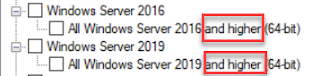
When configuring an Windows Client and Server CI, be careful when choosing the OS that will assess the CI for compliance! Note that for Windows Server 2016 and Windows Server 2019 the phrasing says “and higher” after them. What this means is if you choose Windows Server 2016, the CI will apply to *both* Server 2016 *and* Server 2019 (even if you don’t choose “Windows Server 2019”)! As you can imagine, this can cause problems if you are wanting the CI to only apply to Server 2016! You can get around this by using the option “ Specify the version of Windows manually ”. However, that option does not appear if you choose “ This configuration item contains application settings ” under “ Windows Desktops and Servers (custom) ”. The only thing you can choose is “ This application runs only on computers that have 64-bit hardware ”. If you do not choose the "This configuration item contains application settings" you could then utilize a script to make sure it only appli...

Unable to open Start or Search after Window 7 to Windows 10 1809 Upgrade

Image
This one was a real head scratcher. After upgrading from Windows 7 to Windows 10 1809, you could not open the Start Menu. When you would click on it, nothing would happen. You could also not perform a search. I saw in the System event log: "The server Microsoft.Windows.ShellExperienceHost _10.0.17763.1_neutral_neutral_cw5n1h2txyewy! App did not register with DCOM within the required timeout." about every 30 seconds. I noticed the same thing with Cortana. and "The server Microsoft.Windows.Cortana _1.11.6.17763_neutral_neutral_cw5n1h2txyewy!CortanaUI.AppXfbn8w4s0jbk3tjevpcn9kaxerc6rby8k.mca did not register with DCOM within the required timeout." I captured a procmon trace and found: Both ShellExperienceHost.exe and SearchUI.exe exit with an error (-1073741790 which is Access Denied) as soon as they try to load sysfer.dll (part of Symantec Endpoint Protection). See https://support.symantec.com/us/en/article.TECH252314.html Evidently, sysf...

New Microsoft Office Customization Tool for Click-to-Run (Preview)

Office Customization Tool for Click-to-Run follows the Office 365 Support policy guidelines for Office 365 ProPlus Subscriptions. Agents and Engineers familiar with how to troubleshoot the manual creation of Configuration.xml for use with the Office Deployment Tool will easily be able to transfer that knowledge to this new tool. https://techcommunity.microsoft.com/t5/Office-365-Blog/Customizing-Office-365-ProPlus-using-the-Office-Customization/ba-p/141932

Importing Microsoft Hotfixes into SCUP 2011

Image
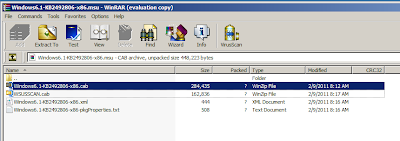
Extract only the .CAB file from the MSU (using WinRAR). In Windows 7 run iexpress.exe. Click Start and in the search box type "Iexpress.exe"                           Click Next on the “Welcome to IExpress 2.0” screen. Click Next on the “Package Purpose” Screen.   On the "Package Title" screen, name the package. I use the name of the CAB – i.e. :   Click Next on “Confirmation Prompt” & “License Agreement” screens. Click “Add” on the “Packaged Files” Screen and browse to the .CAB file you extracted earlier. Make note of the PATH where that .CAB file is located. You will need that. Click Next. On the “Install Program to Launch” screen you will put in the following string in the box next to "Install Program": dism.exe /online /add-package:”<PATH TO THE CAB>Windows6.1-KB2547244-x86.cab” /norestart Click Next. Click Next on the “Show Window”...