ConfigMgr Configuration Item - Be careful!
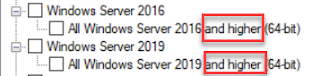
When configuring an Windows Client and Server CI, be careful when choosing the OS that will assess the CI for compliance! Note that for Windows Server 2016 and Windows Server 2019 the phrasing says “and higher” after them. What this means is if you choose Windows Server 2016, the CI will apply to *both* Server 2016 *and* Server 2019 (even if you don’t choose “Windows Server 2019”)! As you can imagine, this can cause problems if you are wanting the CI to only apply to Server 2016! You can get around this by using the option “ Specify the version of Windows manually ”. However, that option does not appear if you choose “ This configuration item contains application settings ” under “ Windows Desktops and Servers (custom) ”. The only thing you can choose is “ This application runs only on computers that have 64-bit hardware ”. If you do not choose the "This configuration item contains application settings" you could then utilize a script to make sure it only appli...